Meaning Of Symbols On Electronics
You’ve probably noticed them—those small icons stamped or printed on every electronic device you own. Some look familiar, others seem like ancient hieroglyphics.
They’re there for a reason, but most people ignore them until something goes wrong or they need to figure out which cable goes where. These symbols serve as a universal language.
Manufacturers use them to communicate important information without relying on words that need translation. Understanding what they mean can help you use your devices safely, dispose of them properly, and troubleshoot basic issues without digging through a manual.
The Power Symbol

That circle with a line through the top has become synonymous with turning things on and off. But the symbol actually combines two concepts: the circle represents a continuous circuit (on), and the line represents a broken circuit (off).
When you see this symbol, you’re looking at the power button. Some devices show just the circle, others just the line.
Modern electronics often use the combined symbol because it works whether the device is currently on or off. Press it once, and you know exactly what will happen.
Standby Mode Indicator

The crescent moon inside a circle means standby mode. Your device isn’t fully off—it’s sleeping.
This mode uses minimal power while keeping the device ready to wake up quickly. Many people think standby and power-off are the same thing.
They’re not. Standby keeps certain components active so the device can respond to remote controls or scheduled tasks.
If you want to save energy, you need to look for the full power-off option instead.
Direct Current and Alternating Current

The straight line with dashes underneath indicates direct current (DC). The wavy line represents alternating current (AC).
These symbols tell you what type of electrical power the device uses or outputs. Most portable electronics run on DC power internally, even if they plug into an AC wall outlet.
The power adapter converts AC to DC. When you see these symbols on a charger or power supply, they show you which side is which.
Battery Status Icons

The rectangle with a small protrusion on one end represents a battery. You’ll find this symbol wherever batteries go—on remote controls, toys, cameras, and countless other devices.
Sometimes the symbol includes plus and minus signs to show you which way to insert the batteries.
Other times, it appears alone just to indicate that the device needs batteries. Pay attention to the orientation marks inside the battery compartment.
Installing batteries backward can damage your device.
Recycling and Waste Disposal

The symbol showing a crossed-out wheelie bin means you shouldn’t throw this device in regular trash. Electronics contain materials that need special handling—metals, plastics, and sometimes hazardous substances.
Many areas have electronic waste collection programs. This symbol reminds you to use them.
Some manufacturers also take back old devices for recycling. The symbol itself doesn’t tell you where to take the item, but it makes clear that regular garbage disposal isn’t an option.
Class II Equipment

Two squares, one inside the other, indicate Class II electrical equipment. This means the device has double insulation and doesn’t need a ground connection for safety.
You’ll often see this symbol on power adapters and tools. The double insulation provides protection against electric shock without requiring a three-prong plug.
It’s a safety feature that allows manufacturers to use simpler, lighter designs.
CE Marking
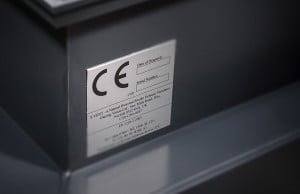
Those two letters, CE, appear on electronics sold in Europe. They stand for “Conformité Européenne,” which means European Conformity.
The manufacturer is declaring that the product meets EU safety, health, and environmental protection standards. This isn’t a quality mark—it’s a legal requirement.
Without it, the product can’t be sold in European markets. The letters often appear small and easy to miss, but they’re there on almost everything from phones to kitchen appliances.
FCC Compliance

In the United States, electronic devices that emit radio frequency energy need FCC certification. The label usually says “FCC” followed by an ID number.
This certification means the device won’t interfere with other electronics or communication systems. The Federal Communications Commission sets limits on electromagnetic emissions, and this symbol shows compliance with those limits.
You’ll find it on Wi-Fi routers, cordless phones, and any device with wireless capabilities.
Protective Earth Ground
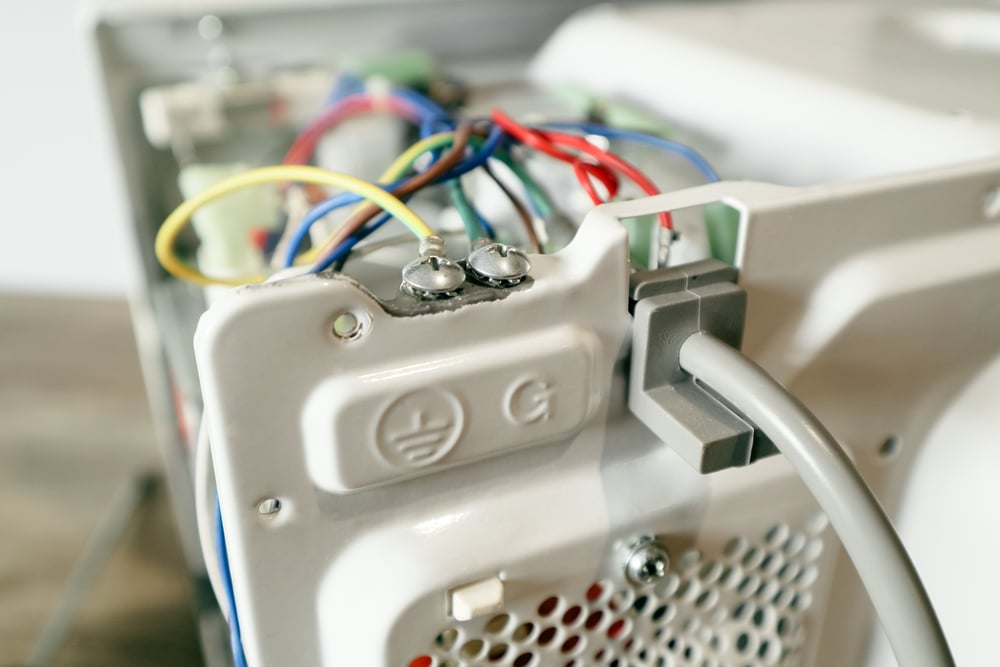
The symbol with three lines branching downward from a single point indicates a protective earth ground connection. When you see this on a power cord or outlet, it means there’s a safety ground that can protect you from electric shock.
The ground wire provides a low-resistance path for electrical current in case of a fault. If something goes wrong inside the device, the current flows through this path instead of through you.
Never remove or bypass a ground connection. That third prong on a plug is there for your safety.
Fuse Location

A rectangle with a line through it points to where the fuse is located. Fuses protect devices from power surges and short circuits by breaking the circuit when too much current flows through.
Some devices have user-replaceable fuses. The symbol helps you find them when needed. Check your device’s manual for the correct fuse type and rating before replacing one.
Using the wrong fuse can create fire hazards or fail to protect your equipment.
Read the Manual

An open book symbol tells you to consult the instruction manual before using the device. You’ll typically see this on equipment with setup requirements or safety considerations.
Manufacturers include this symbol when the device needs more explanation than a few icons can provide. It’s worth your time to at least skim the manual, especially for complex electronics or items with specific safety procedures.
Temperature Warnings

Symbols showing flames or heat waves warn about high temperatures. The device either gets hot during normal operation or shouldn’t be exposed to heat.
Some electronics need ventilation to prevent overheating. Covering the vents or using the device on soft surfaces like beds can cause problems.
These temperature symbols remind you to provide adequate airflow and keep the device away from heat sources.
Water Resistance Ratings

The symbol of a water drop with an X through it means the device isn’t waterproof. Keep it away from moisture.
Other water-related symbols show different levels of protection, often paired with IP (Ingress Protection) ratings. An IP rating includes two numbers. The first refers to solid particle protection, the second to liquid protection.
Higher numbers mean better protection. But even water-resistant devices have limits.
The symbols and ratings tell you what the device can handle, not what you should regularly subject it to.
Caution and Warning Triangles

Warning shows up as a triangle with a ! in it. This means pay attention – something is off with the gadget or how you’re using it.
Look closely. Words nearby tell what’s wrong. Details matter here.
Triangles come in types, each pointing to its own danger. See one with a flash inside, that means electricity could strike nearby.
Fire risks show up as a flame within the shape instead. Wherever the item originates, these marks stay the same across borders.
Noticing Words All Around

Out of nowhere, those little marks begin appearing the moment you pay attention. Found on a laptop here, a toy there, even stuck to that toaster in your kitchen.
Not random at all – each shaped by global agreement to mean something clear. Safety lives in their design, quiet but exact.
Most symbols aren’t worth storing in memory. Yet spotting the usual ones sharpens how you handle gadgets day to day.
Their job? Pointing the way instead of tripping you up. Even across tongues they hold meaning, flashing answers just when things get unclear.
More from Go2Tutors!

- The Romanov Crown Jewels and Their Tragic Fate
- 13 Historical Mysteries That Science Still Can’t Solve
- Famous Hoaxes That Fooled the World for Years
- 15 Child Stars with Tragic Adult Lives
- 16 Famous Jewelry Pieces in History
Like Go2Tutors’s content? Follow us on MSN.